

Mobiletopup.co.uk is a certified reseller of PaysafeCard

How to redeem PaysafeCard on Steam: A Guide for Gamers
If you're an avid Steam user, you may already know that PaysafeCard offers a convenient and secure way to add funds to your Steam wallet. Whether you're eager to purchase the latest game releases, expansion packs, or in-game items, paysafecard provides an excellent solution to continue playing at any time and without a bank account. Redeeming your PaysafeCard on Steam is a hassle-free process that ensures your gaming adventures are uninterrupted. In this guide, we’ll take you through the process step by step. We’ll provide clear instructions and visuals to ensure a smooth experience. From selecting PaysafeCard as your payment method to entering your code and confirming your purchase, you'll find everything you need to know right here. Let’s dive in!
Before you redeem your PaysafeCard
Before heading to your Steam account, you'll need to have a valid PaysafeCard in hand. These prepaid vouchers are available at numerous retail locations and online authorised sellers such as Mobiletopup.co.uk. Buying your PaysafeCard online is very easy and only takes a minute. Once you have your PaysafeCard, follow this step-by-step guide to redeem it on Steam and unlock a world of gaming possibilities.In the sections that follow, we'll take you through each stage of the process.Redeeming your PaysafeCard on Steam: A step–by-step guide
Adding funds to your Steam wallet using PaysafeCard is a straightforward process that allows you to swiftly access your favourite games, software, and digital content. Follow these clear instructions, and in no time, you'll have your Steam wallet loaded and ready for exciting gaming experiences.Step 1: Log in to your Steam account
The journey begins with logging into your Steam account. Once you're signed in, head to the upper-right corner of the Steam interface and click on your account name. From the dropdown menu, select "Account Details". Within the "Account Details" section, navigate to the "Store & Purchase History" tab. Here, you'll spot the option to "Add funds to your Steam Wallet." Click this option to start the process.
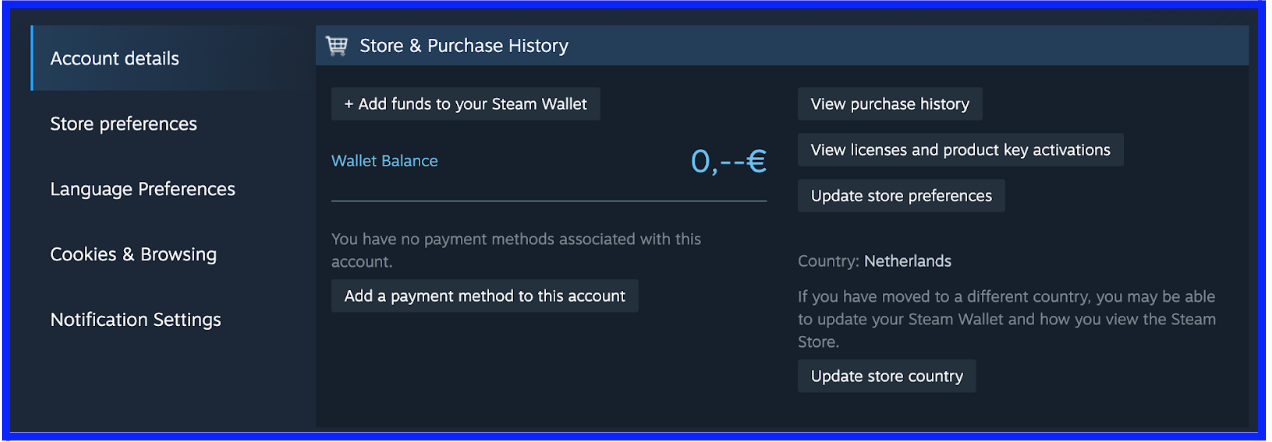
Step 2: Choose your preferred amount and payment method
You'll then find yourself in your cart, where payment method selection is up next. Steam provides a range of payment choices, including credit/debit cards, PayPal, and, naturally, PaysafeCard. Opt for "PaysafeCard" as your payment method to move forward.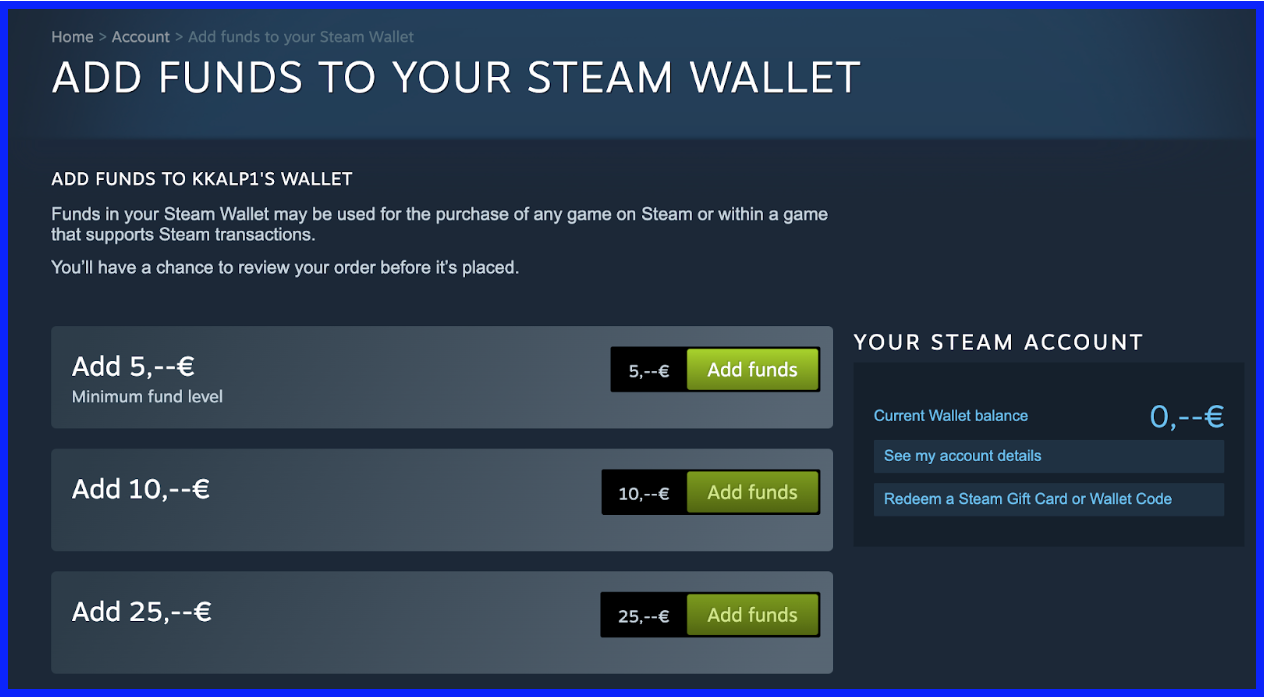
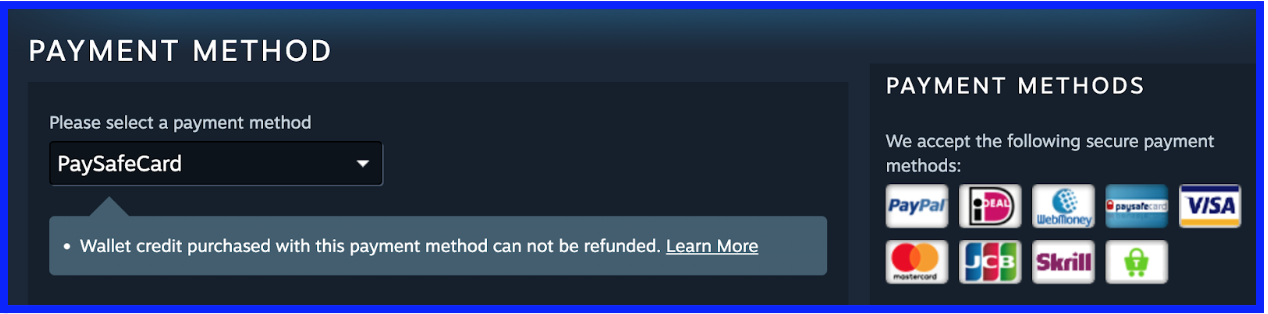
Step 3: Double-check your order details
After selecting it, it's time for a quick review of your order details. Make sure the desired amount you want to add to your Steam wallet is correct. When you're satisfied, hit "Continue" to proceed.Step 4: Enter your PaysafeCard code or log in to your account
If you have a PaysafeCard account, you can log into it at this step to authorise your payment. In case you want to proceed without an account, you’ll need your 16-digit PIN code. Here’s how to find and use it: 1. On your physical PaysafeCard voucher, scratch off the protective layer on the back to reveal a 16-digit PIN code. 2. If you bought your PaysafeCard code online, you’ll find it in your email inbox.3. Enter your code into the provided field on the Steam website.4. Make sure to input the code correctly to avoid any complications.5. After entering the code, you'll have the option to redeem the full value of your PaysafeCard or a portion of it. Make a choice based on your preferences. 6. Confirm the transaction, and Steam will process your payment, adding the funds to your Steam wallet.With these straightforward steps, you can seamlessly redeem your PaysafeCard on Steam and enjoy your favorite games, expansions, or in-game items without any hassle. The process is designed to be user-friendly, allowing you to quickly top up your Steam wallet and dive into the gaming experiences you love.Check out: How to Redeem PaysafeCard on PSN: A Guide For GamersA note on transaction limits
It's important to note that there may be transaction limits when using PaysafeCard. In the UK, it has a maximum transaction limit of 40 GBP when paying without an account. If you have a MyPaysafe account, you can enjoy higher transaction limits of up to 1,000 GBP. These limits ensure secure and convenient transactions while accommodating both small and larger purchases.Instant code delivery by email
Safe & secure payment
Certified reseller
PaysafeCard
Direct delivery