
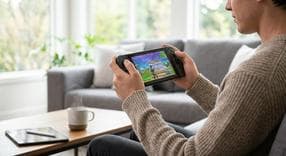
How to Play Fortnite on Nintendo Switch
If you want to learn how to play fortnite on nintendo switch, you are in the exact right place. Getting your console set up for the battle bus is incredibly quick and, best of all, entirely free. Whether you are a brand-new player or a seasoned veteran looking to carry over your progress, jumping into a fortnite nintendo switch lobby takes only a few simple steps.
How to Process Your Fortnite Switch Download
Getting the game onto your console is a very straightforward process. Here is how you can process your fortnite switch download and start playing today:- Turn on your console and navigate to the orange Nintendo eShop bag icon located on your home screen.
- Select your primary user profile to log into the digital store.
- Use the search bar at the top of the screen and type in "Fortnite".
- Select the game from the search results and hit the download button. The game is completely free to download and install.
Supported Consoles: OLED, Lite, and the Original Switch
One of the best aspects of playing this battle royale is that it is fully supported across Nintendo's entire modern hardware ecosystem.Fortnite on Nintendo Switch OLED and Original (V1/V2)
If you are playing fortnite on nintendo switch oled or the standard model, you have the ultimate flexibility to play in docked mode on your television or handheld mode on the go. If you are running fortnite on nintendo switch 1 (the original V1 or V2 console releases), the game still runs smoothly. However, the OLED model gives you a massive visual upgrade in handheld mode. The screen provides richer colors and deeper contrasts that make the vibrant map pop beautifully.Fortnite on Nintendo Switch Lite
You can easily run fortnite on nintendo switch lite without any compromises to the core gameplay. Since this specific console is designed solely for on-the-go play, your experience will be restricted to handheld mode only. For the absolute best experience on the Lite, you should plug in a good pair of headphones and sync a wireless Pro Controller. This helps you hear enemy footsteps clearly and prevents you from wearing out your built-in thumbsticks during intense build fights.What to Expect from Fortnite Switch Gameplay
Understanding fortnite on nintendo switch gameplay will help you set the right expectations and optimize your daily setup. Because of the console's portable hardware limitations, the game typically runs at a capped 30 frames per second (FPS). The resolution will also be slightly lower when compared to high-end PCs or heavy-duty home consoles.Despite the hardware cap, cross-platform progression works flawlessly. By linking your Epic Games account, you get to keep all your earned skins, gliders, and V-Bucks. Whenever you need to grab the latest battle pass or pick up a new outfit from the item shop, you can easily add funds to your account using Nintendo eShop credit.Cross-play is also fully supported, meaning you can squad up with your friends who are playing on a PC, Xbox, or PlayStation. If you want to stay competitive against players on faster platforms, take a look at the active fortnite on nintendo switch reddit communities. Many experienced players over there strongly recommend turning on gyro aiming in your controller settings to help you land precise sniper shots and track fast-moving targets.Fixing "Fortnite on Nintendo Switch Not Working" Errors
Nothing is more frustrating than running into technical difficulties when you just want to drop onto the island. If you ever encounter a fortnite on nintendo switch not working error, try these reliable troubleshooting steps:- Server issues: Before changing any settings on your console, check the official Epic Games public status page to see if their servers are temporarily down for routine maintenance.
- Corrupted data: If your game crashes repeatedly or fails to load, you might be dealing with a corrupted file. You can fix this by going into your console's system settings to clear your cache, or by simply deleting and redownloading the game entirely.
- Internet connection: Lag and matchmaking errors are incredibly common if you are on unstable Wi-Fi. If you are playing in docked mode, try switching to a wired LAN connection to ensure your internet connection is as fast and stable as possible.
Frequently Asked Questions
Instant code delivery by email
Safe & secure payment
Certified reseller
Fortnite Gift Card
Direct delivery